searchkid
SearchKid နဲ့ Telegram မှာ ဇာတ်ကားတွေ ဘယ်လိုရှာမလဲ?
Telegram ဟာ မြန်မာနိုင်ငံမှာ လူကြိုက်များတဲ့ App တစ်ခုဖြစ်ပြီး၊ အဲဒီထဲမှာ ဇာတ်ကားတွေ၊ TV Series တွေနဲ့ ဖျော်ဖြေရေး Channel ပေါင်းများစွာ ရှိပါတယ်။ ဒါပေမဲ့ ကိုယ်လိုချင်တဲ့ ဇာတ်ကားကို ဘယ်လိုရှာဖွေရမလဲ မသိတဲ့သူတွေအတွက် SearchKid က ကူညီပေးပါလိမ့်မယ်။ အဆင့်ဆင့် ဘယ်လိုလုပ်ဆောင်ရမလဲဆိုတာ အောက်မှာ ကြည့်လိုက်ရအောင်။
(ဒီနေရာမှာ blog ပို့စ်ရဲ့ မိတ်ဆက်ပုံ ထည့်သွင်းနိုင်ပါတယ်)

အဆင့် ၁: SearchKid Website ကို သွားလိုက်ပါ
ပထမဆုံးအနေနဲ့ SearchKid website ထဲကို ဝင်လိုက်ပါ။
အဆင့် ၂: ရှာချင်တဲ့ နာမည်ကို ရိုက်ထည့်ပါ
ကိုယ်ရှာချင်တဲ့ ဇာတ်ကားနာမည်၊ TV Series နာမည် ဒါမှမဟုတ် Telegram Channel နာမည် ကို ရှာဖွေရေးနေရာ (Search Bar) မှာ သေချာရိုက်ထည့်လိုက်ပါ။
(ဒီနေရာမှာ Search Bar ပုံ ထည့်သွင်းနိုင်ပါတယ်)

အဆင့် ၃: Search ခလုတ်ကို နှိပ်ပြီး စောင့်ပါ
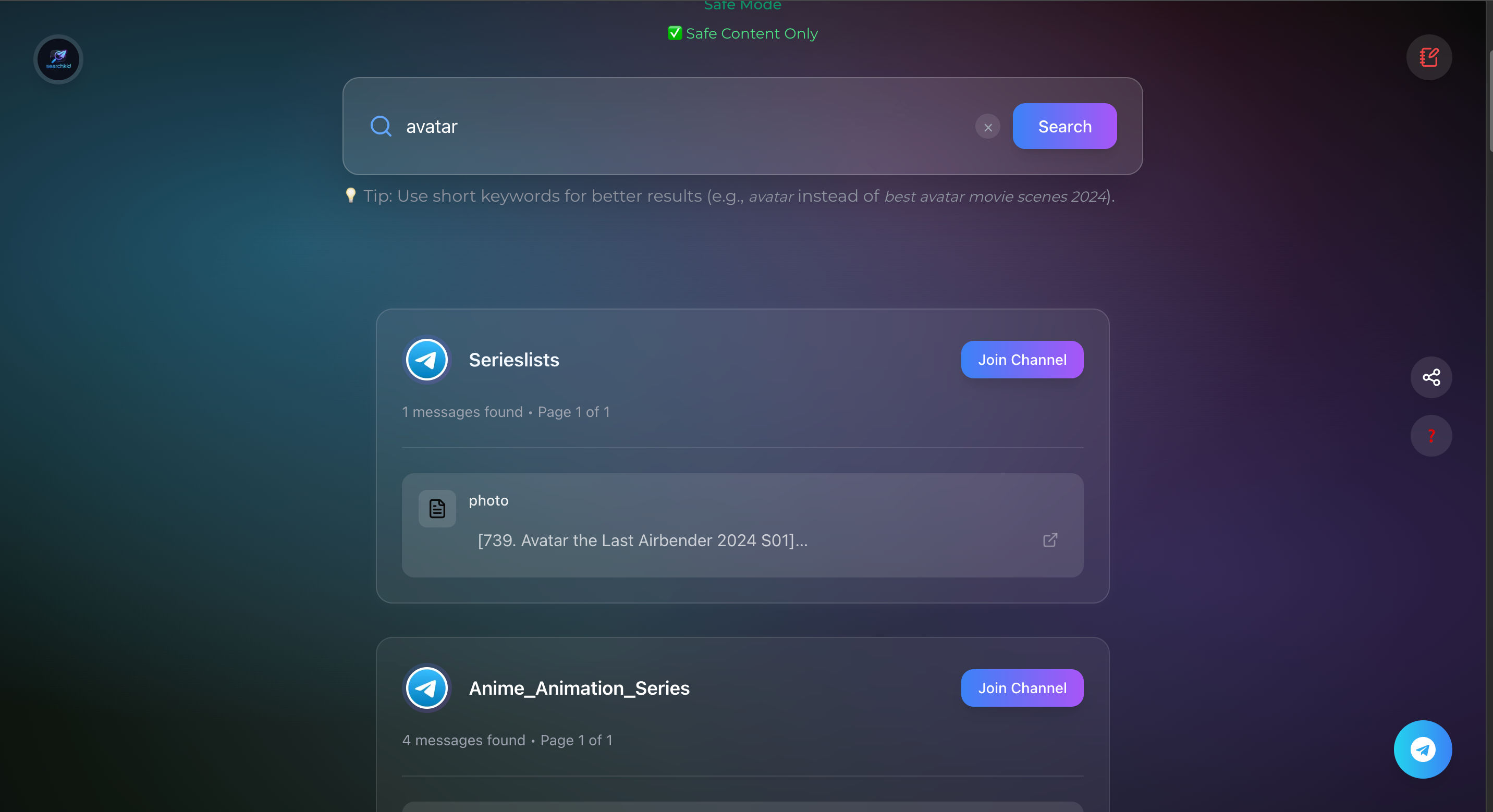
အပြာရောင် Search ခလုတ် ကို နှိပ်ပြီး ခဏလေး စောင့်လိုက်ပါ။ ပြီးရင် ရှာဖွေတွေ့ရှိတဲ့ Telegram Channel Link တွေ စာရင်းလိုက် ကျလာတာကို မြင်ရပါလိမ့်မယ်။
အဆင့် ၄: Link ကို နှိပ်ပြီး ဇာတ်ကားကြည့်ပါ
ကျလာတဲ့ စာရင်းထဲက ကိုယ်ကြည့်ချင်တဲ့ ဇာတ်ကားရှိမယ့် Channel Link ကို နှိပ်ပြီး ဝင်လိုက်ပါ။ အဲဒီ Channel ကို Join လုပ်ပြီးတာနဲ့ ဇာတ်ကားတွေကို အလွယ်တကူ ကြည့်လို့ရပါပြီ။
(ဒီနေရာမှာ ရလဒ်စာရင်း ပုံ ထည့်သွင်းနိုင်ပါတယ်)
အလွယ်တကူ ရှာဖွေနိုင်ဖို့ Tips လေးတွေ
- ရှာဖွေချင်တဲ့ နာမည်ကို လုံးဝတိကျအောင် ရိုက် ပါ။ ရလဒ် ပိုမြန်ပြီး အမှန်တွေပဲ ပေါ်လာပါလိမ့်မယ်။
- Channel ထဲ မဝင်ခင် Channel ရဲ့ အချက်အလက် (Description) ကို ဖတ်ကြည့်ပါ။
- တစ်ခါတလေ Channel တစ်ခုတည်းမှာ မတွေ့ရင် အခြား Channel တွေကိုပါ ထပ်ရှာကြည့် လို့ရပါတယ်။
ဒီအဆင့်တွေအတိုင်း လုပ်ဆောင်လိုက်ရင်တော့ Telegram မှာ ဇာတ်ကားရှာတာနဲ့ ကြည့်တာ အရမ်းလွယ်ကူသွားပါပြီနော်။
How to Find Movies on Telegram with SearchKid?
Telegram is a popular app in Myanmar, and it contains numerous movies, TV series, and entertainment channels. However, for those who don't know how to find the movies they want, SearchKid is here to help! Let's look at how to do it step-by-step below.
(Insert introduction image for the blog post here)
Step 1: Go to the SearchKid Website
First, navigate to the SearchKid website.
Step 2: Enter the Name You Want to Search
Carefully type the Movie Name, TV Series Name, or Telegram Channel Name you want to search for in the Search Bar.
(Insert Search Bar screenshot here)
Step 3: Click the Search Button and Wait
Click the blue Search Button and wait for a moment. You will then see a list of Telegram Channel Links that were found.
Step 4: Click the Link to Watch the Movie
Click the Channel Link from the list that contains the movie you want to watch. Once you Join the channel, you can easily watch the movies.
(Insert search results list screenshot here)
Quick Search Tips
- Type the name exactly to ensure accuracy. This will make the results faster and more accurate.
- Check the Channel's information (Description) before joining the channel.
- If you can't find it in one channel, you can **search other channels** as well.
By following these steps, searching and watching movies on Telegram will become very easy!

Comments
Post a Comment